The Milky Way arching from its bright core to Orion, above green airglow and the terraced mountain ridges of Tà Xùa, Vietnam.

When the stars align

Capturing a panorama is hard enough. Let PanoWeave handle the stitching, whether it's a Milky Way arch or a sunset over the mountains.

Version 0.1.0Tà Xùa, Vietnam. Stitched with PanoWeave

18 photos. 2 rows. One sky.

This sky was shot as 18 separate photos, in two rows. Here is what PanoWeave does with them.

  1. Photos

    Add the photos you shot. They arrive loose, uneven and overlapping.

  2. Align

    Each photo finds its place. Stars meet stars, and the seams are sewn shut.

  3. Export

    Brightness and colour even out. What is left is one sky, clean and uncut.

Three steps, not a manual.

18 photos, 2 rows. Milky Way arch over the tea hills. Stitched with PanoWeave

The Milky Way over rolling tea hills with a lone tree in Long Cốc, Vietnam. One seamless panorama made from 18 photos in 2 rows.

Every star, exactly once.

Where two photos overlap, the usual ways to join them each cost you something.

Mix them
A star rarely sits in quite the same spot in both photos, so the mix shows it twice, or smears it soft.
Cut between them
Every star stays sharp, but the sky changes tone at the cut, and the seam shows.

The blend mode only PanoWeave has

Pixel weave

It takes every pixel of the finished sky from exactly one photo, so there are no doubled stars and no smeared or blurry stars: each one lands once and stays pin‑sharp. And it matches colour and brightness from one photo to the next, so there is no seam to find.

Pixel weave is the default. Multiband, Soft edge, Plain cut and Hard edge are there too, for when you want them.

A close crop of the night sky around Orion and Barnard's Loop, every star a single sharp point, above a mountain ridge.

Pixel weave: every pixel comes from one photo or the other. Each ringed star belongs to just one.

The tints are an illustration: two overlapping photos, A and B, drawn over a real crop of the finished panorama around Orion and Barnard's Loop.

Made for the night.

Milky Way arches, multi-row night panoramas, tracked panoramas. This is the work PanoWeave is made for.

A full 360 degree night panorama wrapped into a little planet: the mountain ridges curl into a small dark globe in the centre, ringed by the Milky Way and a sky full of stars.
The Milky Way double arch - a 360° panorama in Little Planet projection. Stitched with PanoWeave

Tracked panoramas welcome.

On a star tracker the sky holds still while the ground drifts between photos. PanoWeave keeps the sky in one piece.

Star fields are not a problem.

Thousands of near-identical points of light, aligned automatically.

Even skies.

One click evens out brightness, colour and vignetting between photos. It understands sky glow, so stars keep the same brightness from one photo to the next.

Multi-row and full 360°.

Single rows, stacked rows, the whole sphere, a double arch.
And when the sun comes up, it works just as well.

The PanoWeave icon: a daytime print and a night print sewn together with red cross stitches.
A day print and a night print, sewn into one.
The same Long Cốc tea hills at sunset: pink and gold clouds on a blue sky, bright green tea rows, and the same lone tree at the left.
Tea hills at sunset. Stitched with PanoWeaveThe same hills as the night panorama above, in two separate photos.
  • Mountain ridges
  • Coastlines
  • City skylines
  • Architecture
  • Interiors
  • 360° views

Same hills. Same three steps.

PanoWeave is not only for the night. Daytime and landscape panoramas get the same invisible seams.
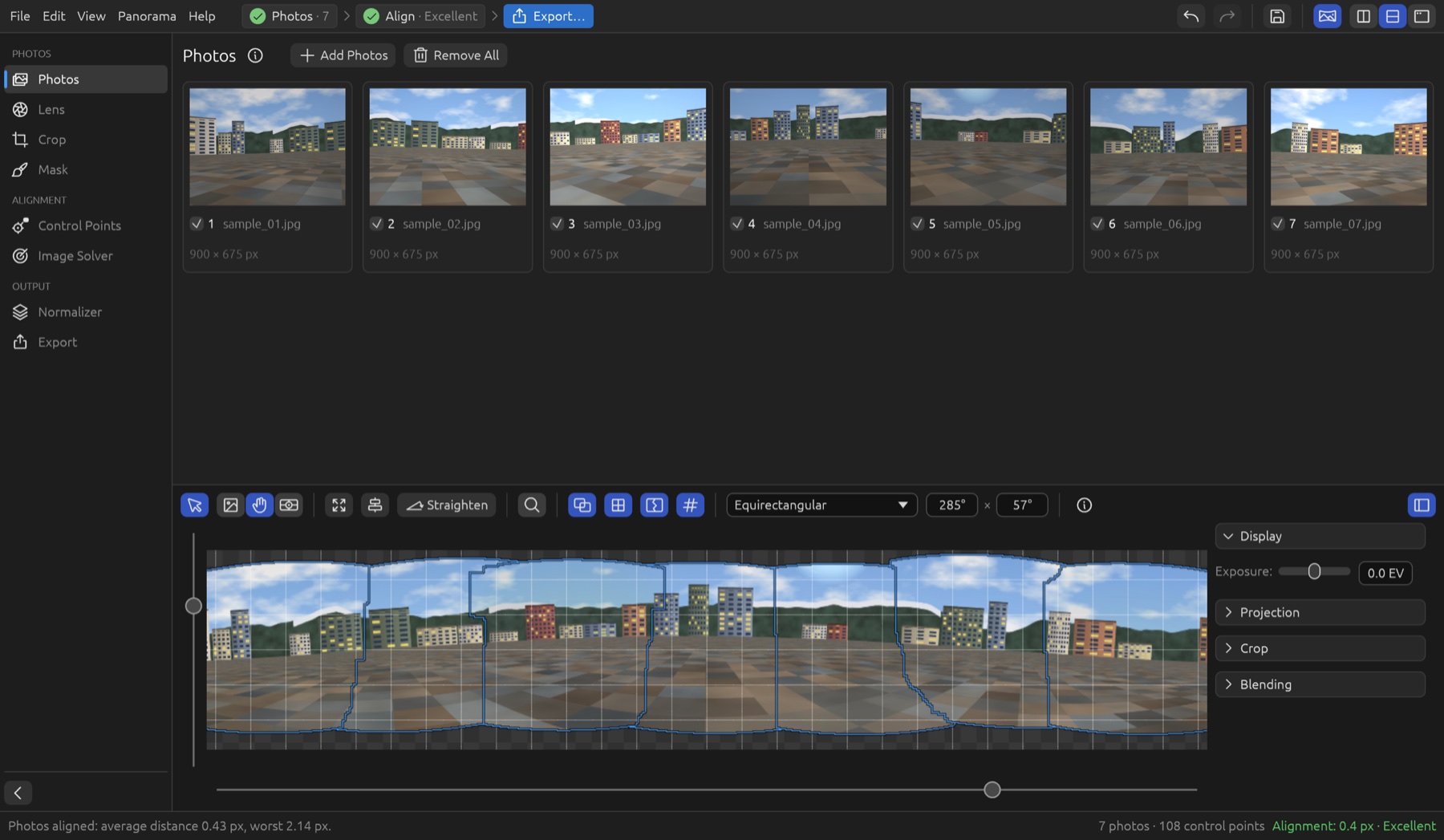
The PanoWeave window on the Photos page: seven daytime photos of a town along the top, the three-step path Photos, Align, Export in the header, and the stitched panorama in the Preview below.
PanoWeave with its built-in sample, a daytime town panorama.

Three steps. A toolbox when you want one.

Photos, Align, Export. If your photos align cleanly, you never have to learn anything else. When a panorama needs care, the tools are there.
Check your work

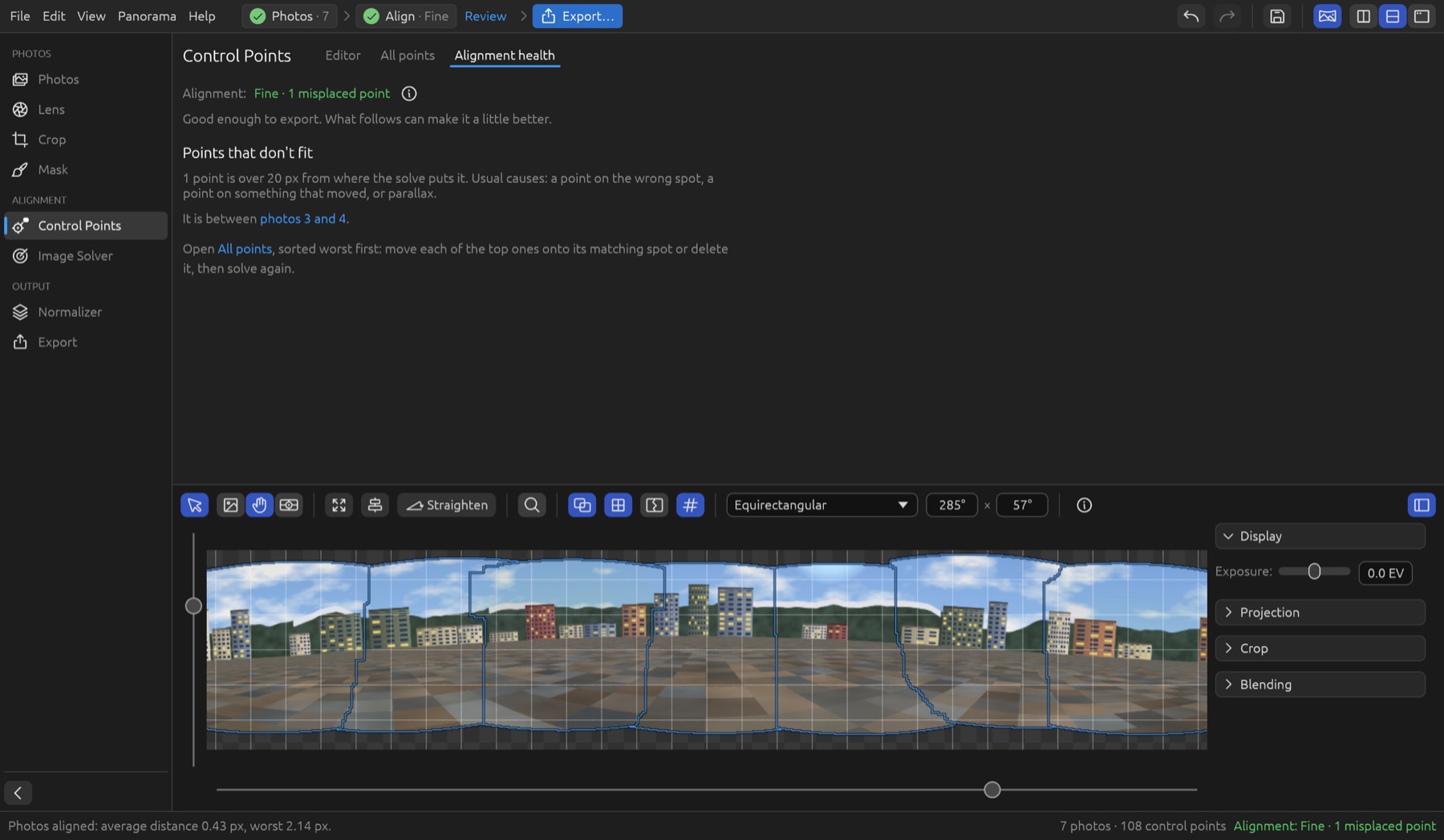
Alignment health
One honest rating: Excellent, Fine, Fair or Poor. When something is off, PanoWeave says what, in plain words, and points to the photos involved.
Live Preview
Drag the panorama, straighten it, pick the centre. 13 projections, from classic wide views to full spheres and little planets.
Loupe
Inspect the stitched result at full detail before exporting, or look around inside it.
The Alignment health view in PanoWeave. The rating reads Fine, with a short plain-words explanation of one misplaced point and a link to the two photos involved.
Alignment health says what is off, and where.

Take control

Masks
Paint over what should stay out, or what should win.
Full manual control
There when you want it: Control Points, Lens, Crop.

Finish and keep

Export for serious work
JPEG, PNG, TIFF, Photoshop PSD and PSB. 8-bit, 16-bit and 32-bit. sRGB, Display P3, Adobe RGB, ProPhoto RGB, Rec. 2020. Optionally, every photo as its own layer for retouching.
Big panoramas on an ordinary computer
You set the memory limit. PanoWeave stays inside it.
Private
No account, no upload, works offline. Projects save and reopen, with undo throughout.
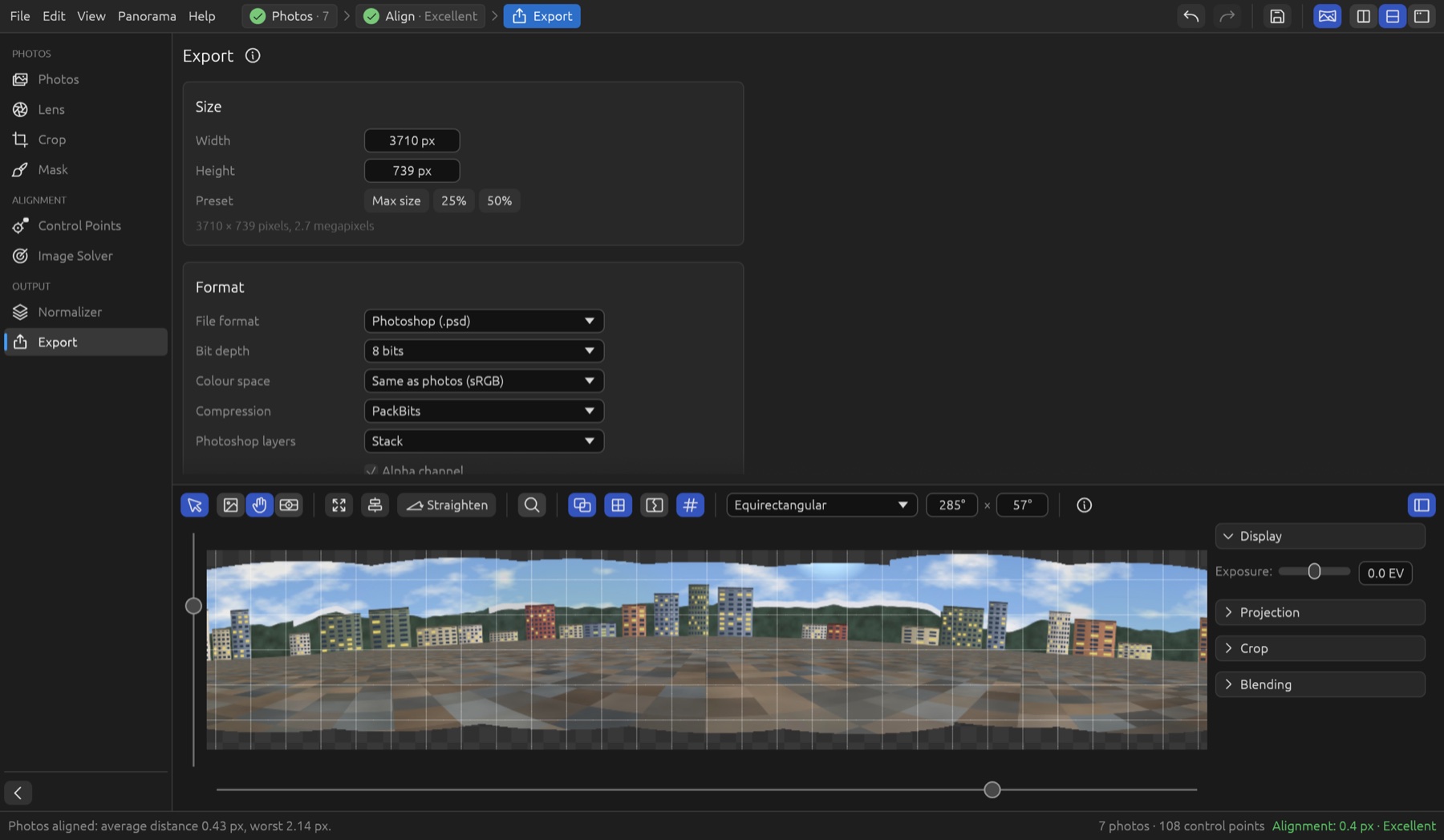
The Export page in PanoWeave, with settings for size, file format, bit depth and colour space above the panorama Preview.
Export: size, format, bit depth, colour space.
The Milky Way arching across a dark southern sky full of stars.

Clear skies. Clean seams.

PanoWeave for macOS. Made for the night sky, just as good by day. No account, no cloud. Your photos never leave your Mac.

Version 0.1.0The southern Milky Way arch - Pham Viet Tin. Stitched with PanoWeave.